
Referral Program
Share rotki premium with others. The person who uses your code gets a discount on their first subscription, and you earn account credit toward your own renewals.
Overview
When someone subscribes using your referral code:
- The referee (person using the code) gets a discount on their first subscription.
- You (the referrer) earn account credit based on what they pay. The credit is added to your balance and applied automatically to your future purchases, renewals, and upgrades.
The exact discount and credit are shown in the app at the point where they apply, so you always see the current values.
Screenshots are examples
The discount and credit amounts shown in the screenshots on this page are examples. The actual values applied to your account may differ.
Who can create a code
You only need a rotki.com account with a confirmed email address to create a referral code. An active premium subscription is not required.
Creating and Sharing a Referral Code
- Go to your subscription page.
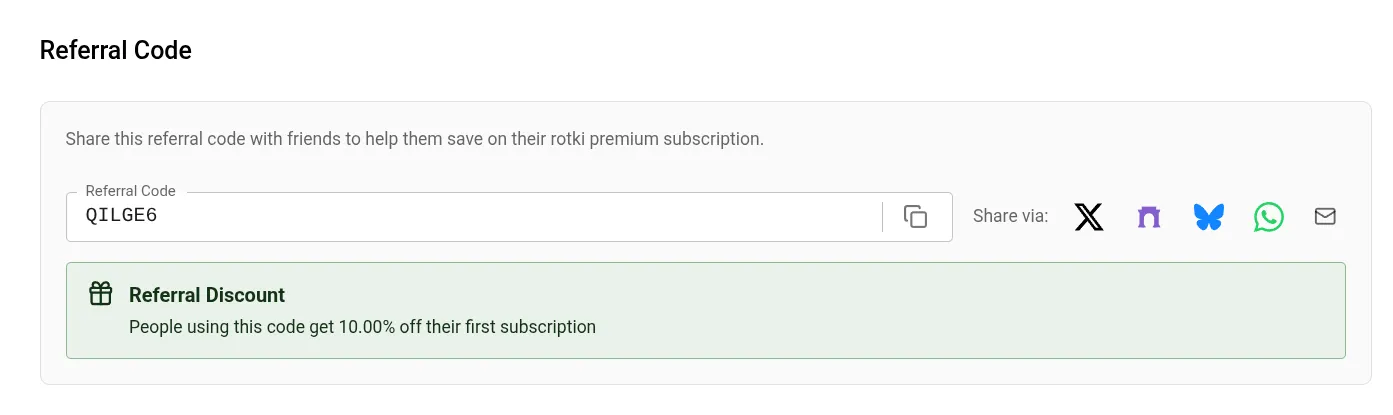
- Find the Referral Code section.
- Click Create. A unique code is generated for your account.
- Share it in either of two ways:
- Copy the code and send it directly, or
- Use the built-in share buttons for X, Farcaster, Bluesky, WhatsApp, or Email.
Your share link looks like https://rotki.com/products?ref=YOURCODE. When someone opens it, the discount is remembered and applied automatically at checkout, so they do not have to type anything.
One code per account
Each account has a single referral code. Once created, the same code is reused every time you open the Referral Code section.
Using a Referral Code
There are two ways a code gets applied at checkout.
Via a share link (recommended):
- Open the referrer's
https://rotki.com/products?ref=CODElink. - Choose a plan and proceed to checkout.
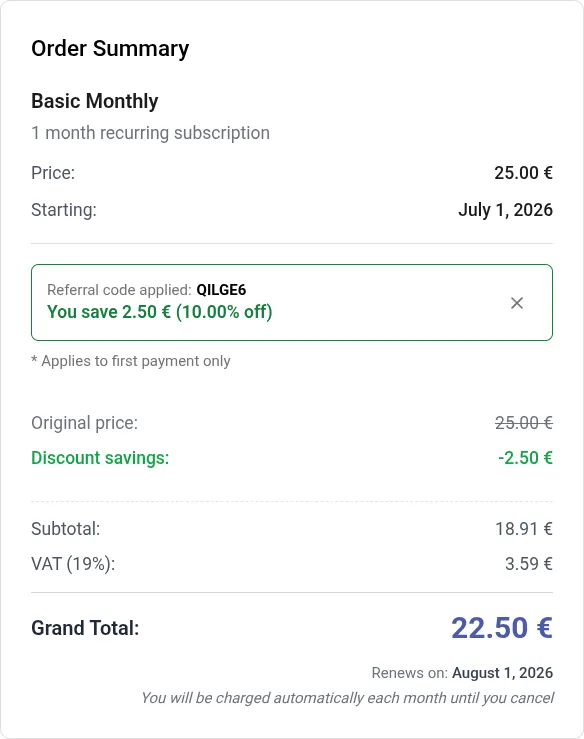
- The discount is applied automatically. You will see "Referral code applied" along with the amount saved.
The link is remembered for 30 days, so the discount still applies even if you browse other pages before checking out.
Entering the code manually:
- Go to the plans page and choose a subscription tier.
- Proceed to checkout.
- In the Discount/Referral Code field, enter the code and click Apply code.
- The discount and "Referral code applied" confirmation appear.
First payment only
A referral discount applies only to the first payment of a new subscription. Renewals and later subscriptions are charged at full price.
Referrer Rewards (Account Credit)
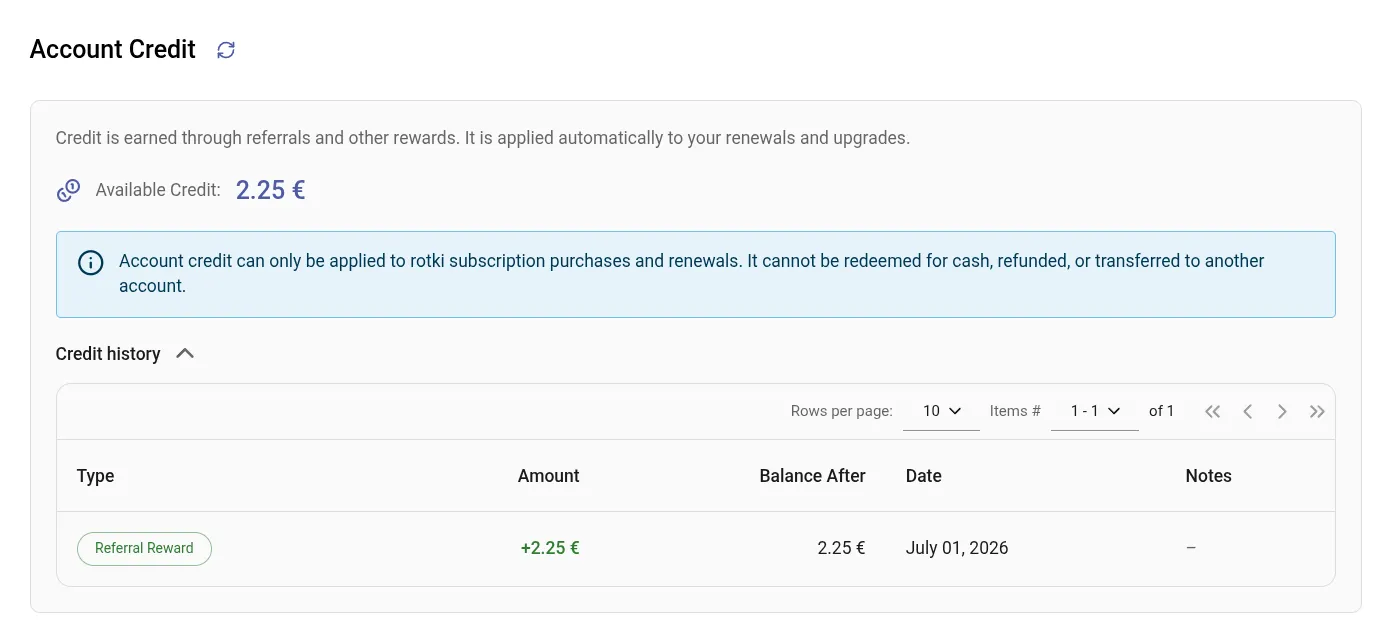
When someone you referred makes their first qualifying purchase, you receive account credit based on what they paid.
Loading current rates…
- Your balance and a full history of credit earned and used appear in the Account Credit section of your subscription page.
- Credit is applied automatically to your subscription purchases, renewals, and upgrades. You do not need to enter anything.
- Credit is granted once per referred user, on their first non-upgrade purchase.
How credit can be used
Account credit can only be applied to rotki subscription purchases and renewals. It cannot be redeemed for cash, refunded, or transferred to another account.
Rules and Limitations
- A referral discount applies to the first payment only.
- Only one code can be applied per checkout. Referral and discount codes share the same field and cannot be stacked.
- You cannot use your own referral code.
- Referral codes cannot be applied to plan upgrades, only to new subscriptions.
- Codes have a usage limit and an expiry date. An exhausted or expired code is rejected at checkout.
Troubleshooting
I can't create a referral code
- Make sure your account's email address is confirmed. Creating a code requires a confirmed email.
- Refresh the page and try again.
- Contact info@rotki.com for assistance.
My referral code isn't working
If someone reports your code does not work:
- Verify the code was entered correctly and check for typos.
- Confirm they are purchasing a new subscription, not an upgrade. Codes do not apply to upgrades.
- Make sure they are not trying to use their own code.
- The code may have reached its usage limit or expired. Contact support with the specific error message.
The discount isn't applying
If the discount does not show at checkout:
- Confirm the code was entered in the Discount/Referral Code field and Apply code was clicked.
- If you used a share link, make sure the discount was not dismissed during checkout.
- Check for any error message shown under the code field.
- Ensure it is a first-time payment. Renewals and upgrades are not discounted.
- Contact info@rotki.com with details.
I lost my referral code
- Go to your subscription page.
- Open the Referral Code section. Your code is displayed there.
- If it is not shown, contact info@rotki.com for assistance.
Where does my referral credit show up?
- Go to your subscription page.
- Open the Account Credit section to see your current balance and full credit history.
- Credit is applied automatically to your next purchase, renewal, or upgrade.